
hi there 👋. In this blog post, we explore the build performance difference between modularized vs. monolithic architectures, using Pocket Casts Android as an example1.

TLDR;
We compared build performance between Pocket Casts Android’s modularized architecture (37 modules) and a monolithic version (1 module). Results show modularization delivers 2-3.6x faster build times for local development and 3x faster CI builds. The trade-off? IDE sync times are 5x slower with modules. Despite this, modularization’s benefits for build performance are substantial, especially for teams working on feature modules or running frequent CI builds.
The idea
If you’re in the Android development world, chances are you’ve heard about modularization and its promise to improve build performance.
But modularization doesn’t come for free – particularly for mature projects that weren’t designed with it in mind. And the effort to refactor into a modularized architecture can be significant. So while performance improvements are compelling, how substantial are these build time gains in practice? And how does modularization stack up against other optimization techniques, like leveraging Kotlin Compiler’s compilation avoidance?
Modularization
Modularization is a practice of organizing a codebase into loosely coupled and self contained parts. Each part is a module. Each module is independent and serves a clear purpose.
What is modularization?
To answer these questions, we decided to run benchmarks on the same app. Since de-modularizing is significantly easier than modularizing, we took our open source Pocket Casts Android app and merged all its modules into one. In the following paragraphs, we’ll refer to these two project variants as:
- Modules – the current version of Pocket Casts, with 37 modules
- Monolith – a single-module version, where all modules are merged into one
The Monolith is available on this GitHub repository with the caveat that it focuses solely on the mobile application module and excludes tests.
Methodology
We used the Gradle Profiler tool to run benchmarks. The tests were conducted on a MacBook Pro M1 Max with 32GB RAM, ensuring the machine had a constant power supply and didn’t enter sleep mode. The task being measured was assembleDebug, executed against the app module.
The Modules variant was based on commit 5438f38, while the Monolith variant was based on commit 7274783.
It’s important to clarify the concept of “depth” in the context of this experiment. In a modularized project, depth refers to how many other modules depend on a given module. For example, if we only measure the depth of 1 (where a module depends solely on the main module), it would give a misleading view of the impact. A change in a module with a depth of 12, where 12 other modules depend on it, will have a significantly different effect on build times compared to a module with a shallower dependency chain.
In the Monolith scenario, the concept of depth becomes less relevant since there’s only a single module. However, Kotlin Compiler’s compilation avoidance mechanism should still come into play, improving build times when less interdependent pieces of code are updated. For consistency, I maintained the terminology across both scenarios.

compose module is a direct dependency of 12 modules, meaning it has a “depth” of 12. Any non-internal change will trigger a rebuild of at least these 12 modules. In practice, the impact is even greater – rebuilding, for example, a view will result in a rebuild of other modules that depend on it. However, for simplicity and readability, I’ve shortened this to refer as “depth” of 12.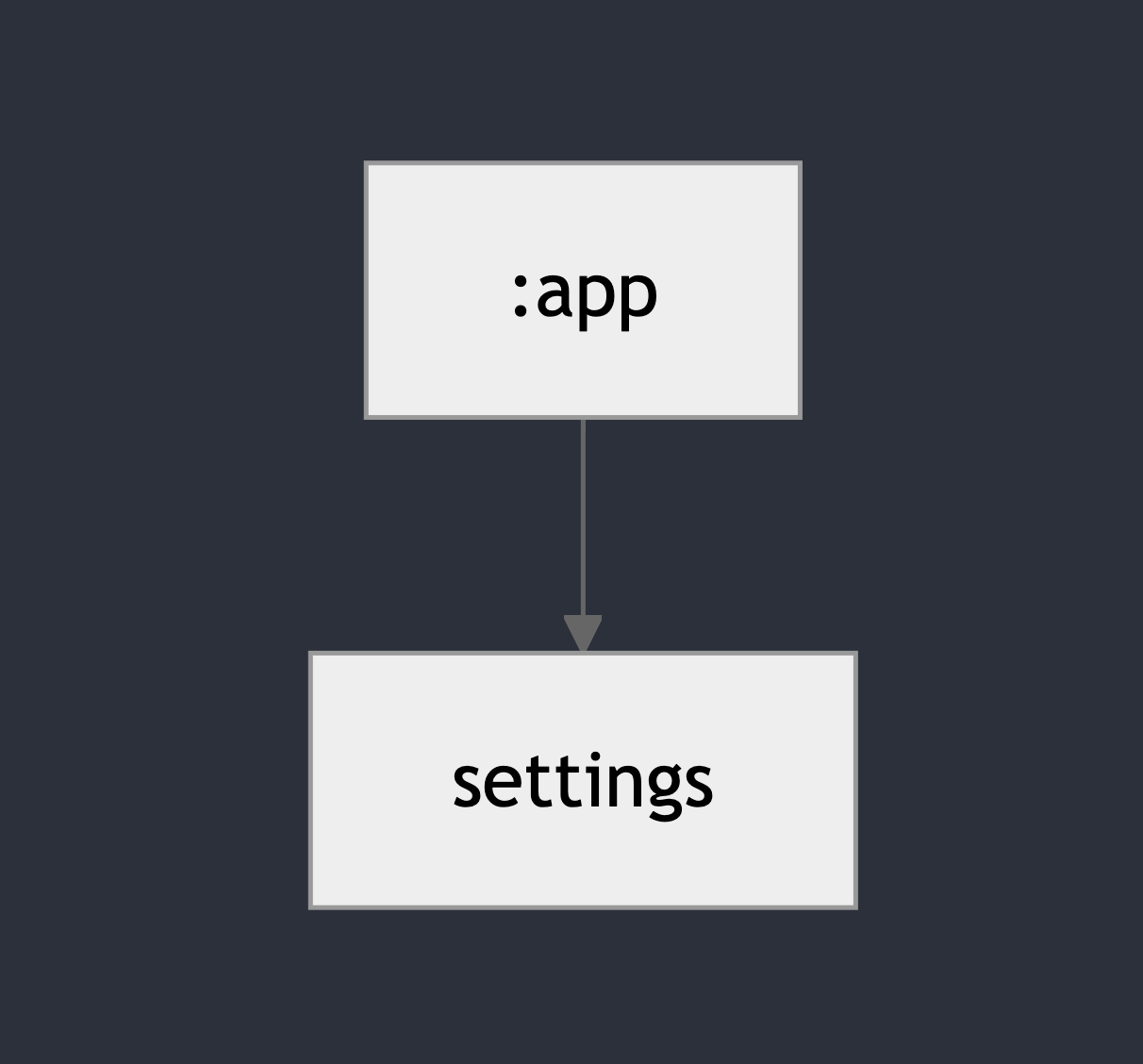
settings module is a direct dependency of only 1 module, this means it has a “depth” of 1. Whenever this module is rebuild, only app will be rebuild as well. Results
See interactive graphs.
Did you know?
ABI changes affect the public API (e.g., modifying public methods or classes) and require recompilation of dependent modules. Non-ABI changes (e.g., private logic updates) don’t impact the public API, helping speed up incremental builds!
Build Performance Comparison
| Depth 1 (feature modules) | Depth 12 (core modules) | |||
| Monolith | Modules | Monolith | Modules | |
| 1: Non-ABI changes | 12.7s | 3.5s ⚡ 3.6× faster | 13.1s | 5.9s ⚡ 2.2× faster |
| 2: ABI changes | 13.4s | 4.1s ⚡ 3.3× faster | 13.8s | 10.8s 🤏 1.3× faster |
| 3: PR on CI | 61.0s | 20.5s ⚡ 3.0× faster | 61.5s | 20.2s ⚡ 3.0× faster |
| Monolith | Modules | |
| 4: IDE Sync | 0.8s ⚡ 5× faster | 4.0s |
Scenario 1: Non-ABI changes
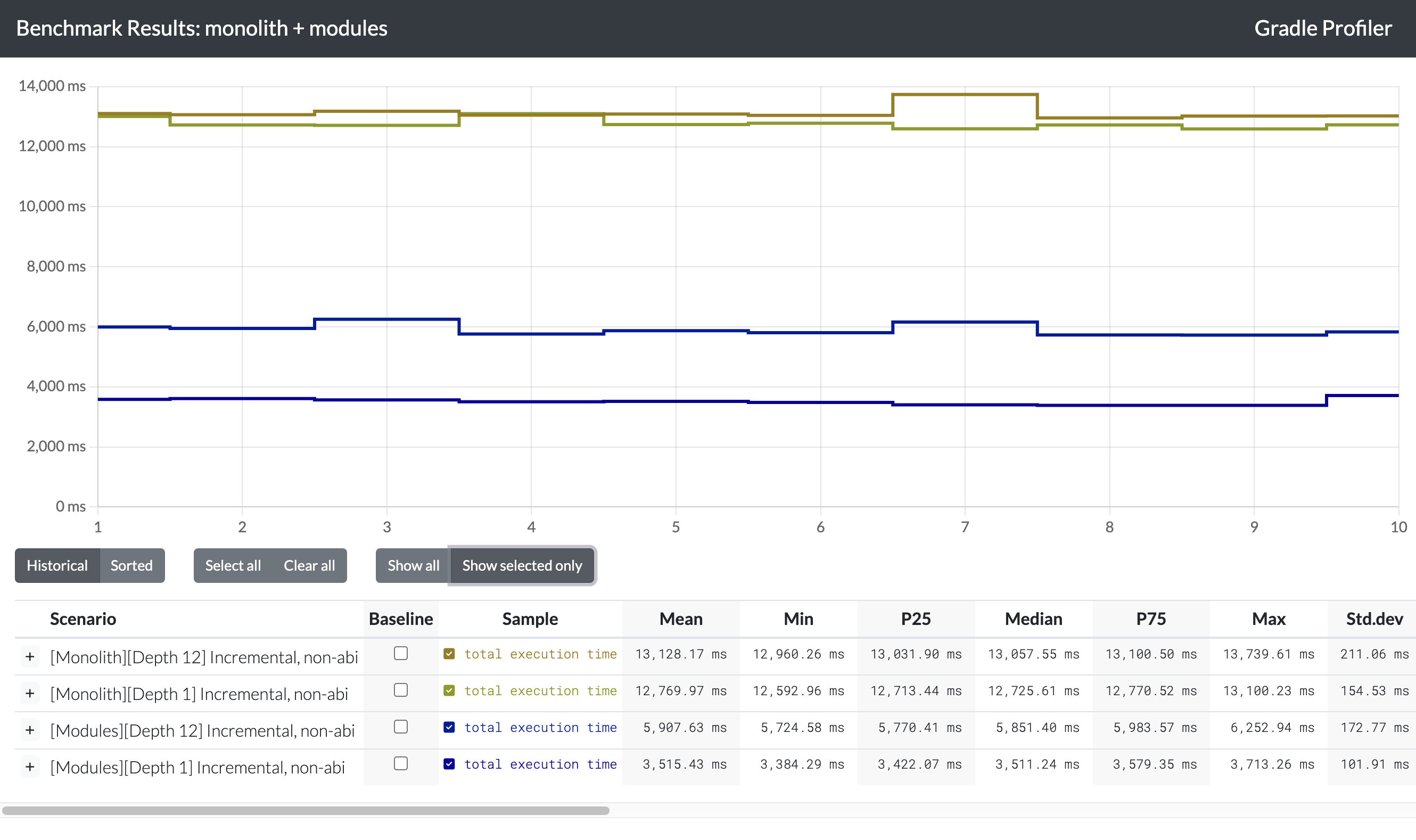
This scenario highlights the significant speed advantage of the Modules approach over the Monolith. In the Monolith, rebuilding code that many other parts depend on shows little to no improvement in build times. In contrast, the Modules approach excels, with significantly faster rebuild times for modules with shallower dependency “depth.” For example, updates to the settings module take a median of just 3.5 seconds, while edits to the compose module take 5.9 seconds – both far faster than Monolith rebuilds. The difference between settings and compose is likely due to compose’s more complex code generation tasks, but the overall efficiency of the Modules approach remains clear.
Scenario 2: ABI changes
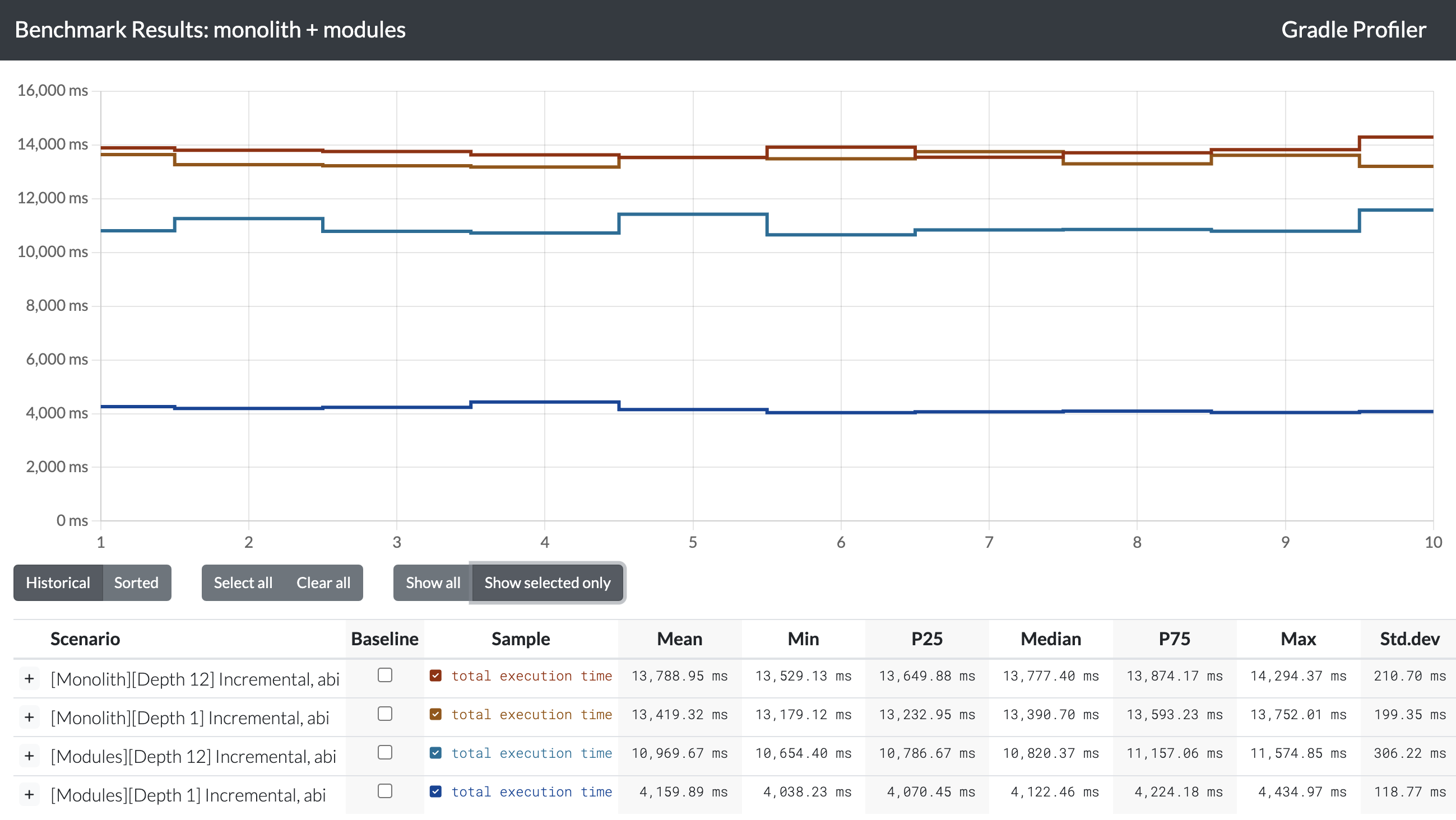
For an ABI change, we observe that the Monolith build still takes longer overall. However, the difference between a “depth 12” module and a “depth 1” module is as much as 7 seconds. This is because a “depth 12” module is a dependency for many other modules, as explained earlier. Consequently, not only does the compose module need to be rebuilt, but several other dependent modules as well. This is close to the worst-case scenario for Modules. Despite this, the Modules approach remains faster than the Monolith.
Scenario 3: PR on CI
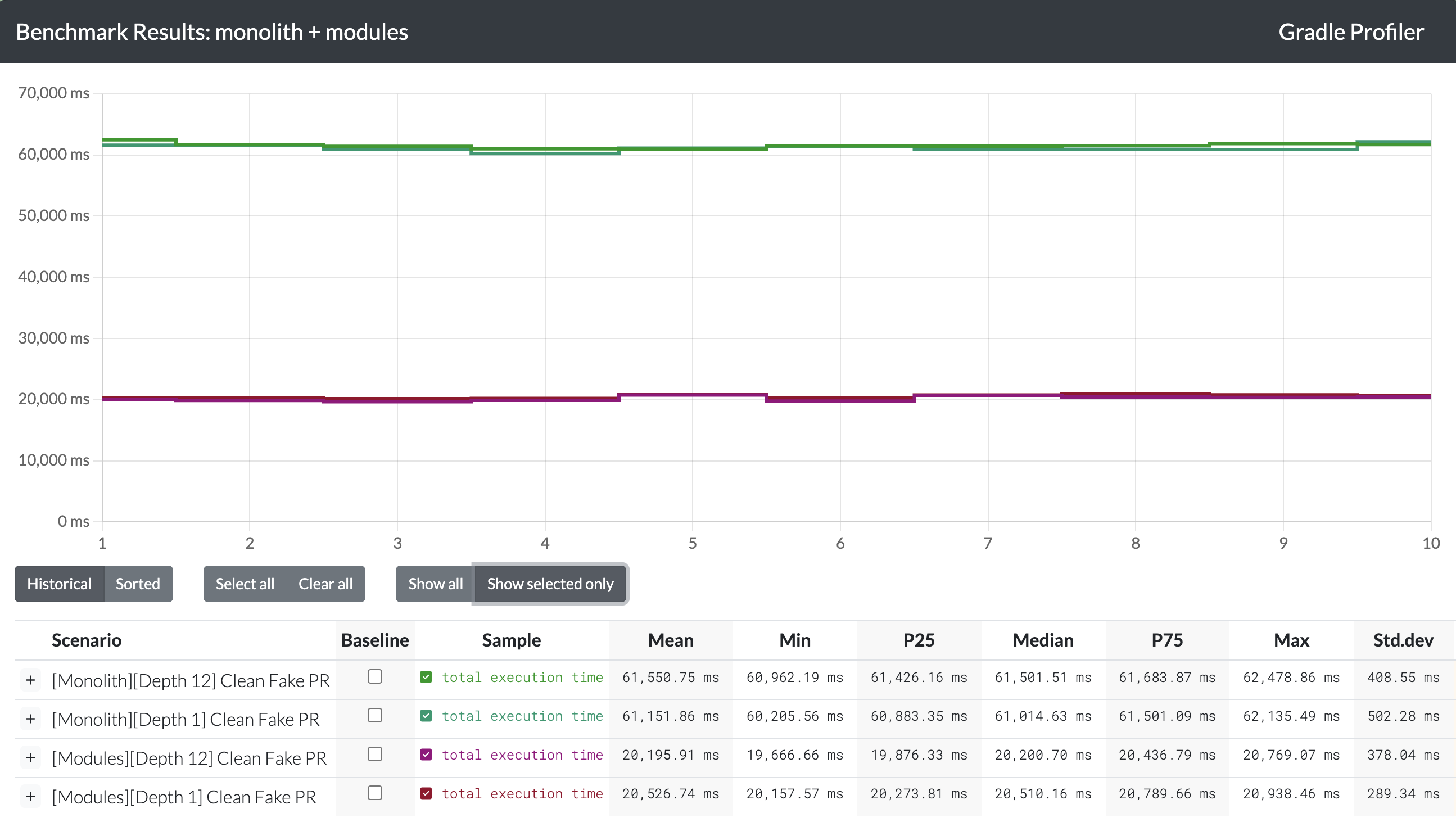
The “Fake PR” scenario emulates a CI environment. To replicate this, a clean task is run before every build, and the configuration cache is disabled. Three types of changes are applied: an ABI change, a non-ABI change, and a composable change, which adds a @Composable file to force the Compose Compiler to run. The difference here is striking – the Modules build is three times faster than the Monolith. This improvement is primarily due to the ability to parallelize builds in the modularized approach.
Scenario 4: Android Studio sync
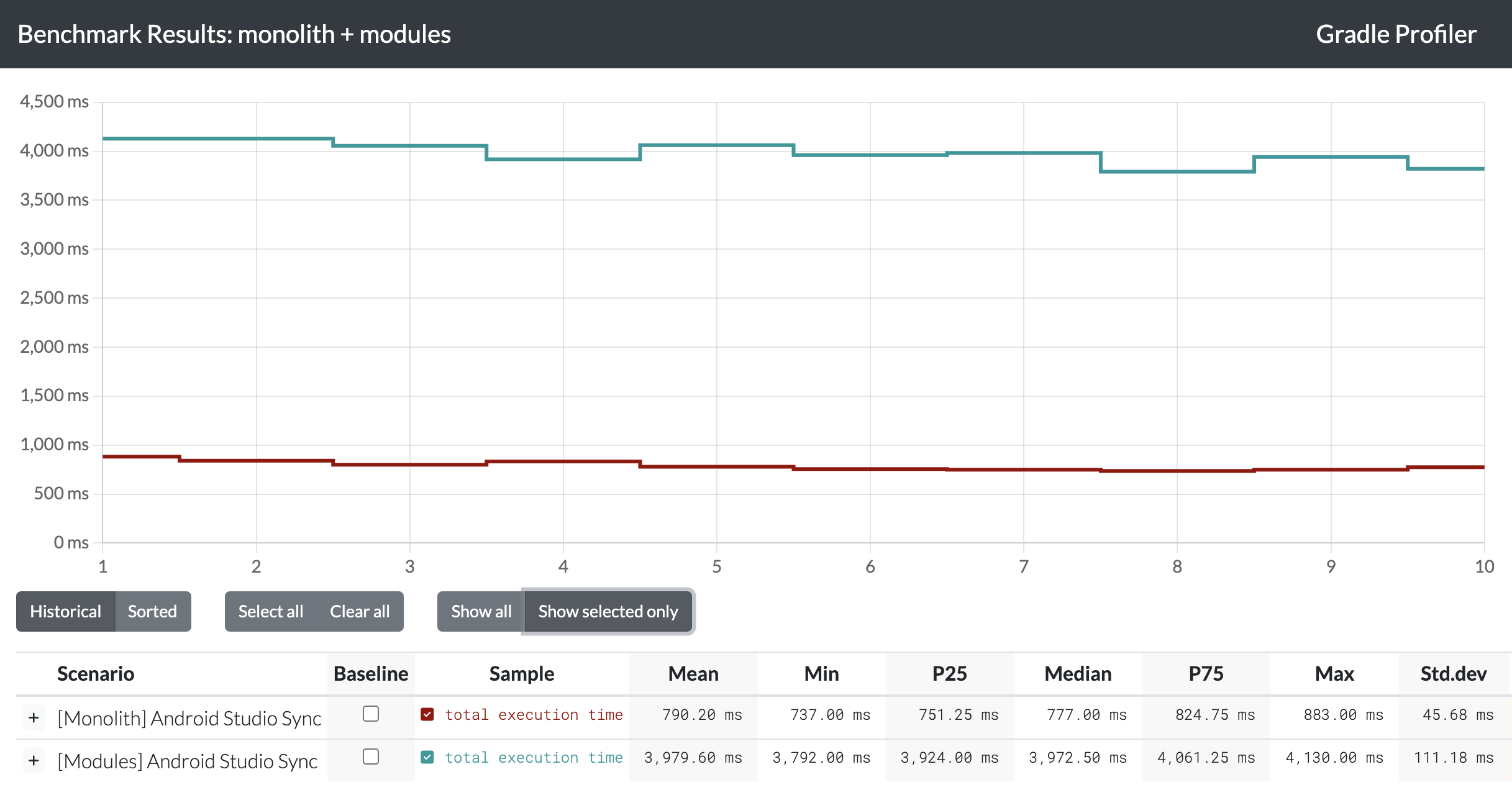
There is one scenario where the Modules setup is slower than the Monolith: Android Studio sync. Having more modules increases the indexing workload for IntelliJ IDEA, and the difference is definitely noticeable.
Conclusions
- Modules are much faster: There’s no doubt that the Modules setup is faster than the Monolith, especially in two key scenarios:
- When working on a module that is not a dependency for many others (e.g., feature modules).
- On CI, where builds can be parallelized.
api/impldivision could bring further improvements. As these results show, when only one module needs to be built, the overall build time decreases significantly.
Is it worth modularizing?
I don’t know! And this post isn’t trying to answer that question. The decision to modularize depends on many factors, including team priorities. Modularization isn’t just about build times – it’s also about enabling code reuse, enforcing separation of concerns, structuring architecture more strictly, and simplifying sub-team responsibilities.
If we focus purely on build performance, then yes: modularization definitely improves both local and CI build times, often by a significant margin.
Thanks for reading!
#architecture #microservices #programming #software-development #technology
- This research was conducted as part of the Apps Infrastructure team’s mission at Automattic to empower product teams with data-driven insights for technical decisions. While initially aimed at informing our internal Android architecture discussions, I hope these real-world benchmarks prove valuable for any technical leaders evaluating modularization. ↩︎
 Mobile.blog